Start here
Every prompt from the AI Foundations Claude for Marketing full course, in the order they appear in the video. Hit Copy on any box and paste it into Claude (or Poppy, where noted). Anything in [square brackets] is a placeholder: swap in your own details.
Each prompt shows the time it appears in the video, so you can jump straight to the part where it's used.
Get Poppy: the one connector the course uses for research, posting, images and ads.
Stage 1: A Claude that knows you
1. Interview me, then write custom instructions
In the video: 11:19
I would like you to interview me with the user question and answer tool:

    Learn about my company
    Learn about my marketing and branding
    Learn about my goals (longterm)

Keep everything evergreen or long term in your assumptions.

After that your final output should be custom instructions for Claude.
Where it goes: paste the output into Settings → Account → Instructions for Claude.
2. The GCAO framework (Goal, Context, Action, Output)
In the video: 14:41
A template, not a paste-in prompt. Fill in each line before you send anything important.
Goal:
Context:
Action:
Output:
3. Generic prompt (the "before" example)
In the video: 18:18
Find some posting ideas for LinkedIn that will help me grow my business and drive traffic to my offers4. The same request written with GCAO
In the video: 19:15
Goal:
Grow my follower and connection count on linkedin with people that will actually want what we are offering.

Context:
- My linkedin is dry right now, haven't posted in a while
- I want to come out of the gate with posts that will get immediate traction and engagement
- I don't want you to make generic ai posts, I'd like these posts to sound like me

Action:
- Find post topics
- Create a post in my voice that we can post on linkedin

Output:
- A codeblock that I can copy and paste
5. LinkedIn Posts project instructions
In the video: 22:13
Take prompt 4 and make these changes, then save it as the instructions for a Claude Project called LinkedIn Posts.
Context (added):
- Update and utilize the memory for future context

Action (replaced):
- Respond to the user with actionable, helpful, completed information
- Do relevant research, craft posts in the brand voice of Carter
- Fill posts completely using the context files. Leave no placeholders.

Output (replaced):
- For posts, output them individually in copy-paste code blocks
- Research the web, but keep it concise in the chat. The main objective is outputting posts.
6. Check that Poppy is connected
In the video: 33:13
Typed inside the LinkedIn Posts project.
Do you have access to Poppy through the MCP?7. Research top LinkedIn posts
In the video: 33:43
Research top LinkedIn posts for AI educators and find the outliers. Report back with what is working.8. Draft posts from the research
In the video: 35:43
Write some draft posts using all the context you have now. Use the exact formats that have worked on LinkedIn before.9. Research images and links for the posts
In the video: 36:38
Research and see if the top posts are using images, and if so, find out what kinds of images they are using so that we can reverse engineer that with these posts. And also tell me what kind of links we should put in here. I think that maybe some links to some free resources or some free YouTube videos that I've already made would be a good start. You can use Poppy to find all of my existing videos on my YouTube channel as well.10. Pick the posting order
In the video: 39:19 (said aloud; the typing was cut)
Go ahead and tell me the posting order that you think would work best for this.11. Schedule the posts through Poppy
In the video: 39:25
Go ahead and post these as scheduled posts using the Poppy MCP on my LinkedIn account. And whatever one is going out first, I want you to just post it right now.12. Turn the workflow into a weekly LinkedIn post skill
In the video: 43:11
I would like you to create a skill out of this workflow that creates unique posts once per week and queues them up to be scheduled once I approve one or multiple. This will run on a routine.

The desired output is a simple table with proposed schedule dates

And visual previews of what all the posts will look like

We should never repeat posts, only distill what has worked by looking at all the past posts, any media you need can be generated with poppy via gpt image.

Posts should not be scheduled until the user says:
"Go"

Again this will be a weekly routine that requires looking back at past posts and finding whats working on linkedin at that very instant when the posts are drafted all via poppy.
13. Scheduled task instructions (weekly LinkedIn batch)
In the video: 45:57
Used as the instructions for a scheduled task. In the course it runs on Haiku every Monday at 7:00 AM.
Follow this skill when you run. Wait for my instructions after it has run.14. Approve the batch
In the video: 49:37
Go schedule them in the available slots.Stage 2: Posts on autopilot
15. Interview to write voice.md and about.md
In the video: 23:40
Interview me to build two reusable reference files for writing social media content in my voice: voice.md and about.md. My voice is the highest priority. Capture the way I actually think, speak, and write, including the natural imperfections that make me recognizable.

Do not write the files yet. First conduct a USER QUESTION AND ANSWER interview using the available user question-and-answer tool.

## Interview mechanics

- Discover and use the environment's actual user question-and-answer tool. It may be named USER QUESTION AND ANSWER, ask_user_question, request_user_input, or something similar. Use it for the interview and follow-up questions. If it is asynchronous, wait for my submitted answer before continuing with dependent questions. Never answer for me or treat silence as agreement.
- If no such tool is available, tell me briefly and conduct the same interview conversationally, one question at a time. Do not pretend you called a tool.
- Ask one focused question at a time, with at most one closely related follow-up. Do not hand me a long intake form. Let each answer influence the next question.
- Prefer free-text answers for stories and voice discovery. Use choices for concrete preferences and comparisons, with room for my own answer. Avoid leading me toward a preselected personality or a flattering description.
- Make answering easy. Invite rough notes, unpolished paragraphs, or voice dictation. Do not make me perform a polished version of myself.
- Listen for interesting specifics and follow them. If I say something generic, ask for a real example: what happened, what I did, what changed, or the words I actually used.
- Skip questions I have already answered. Briefly reflect back useful findings every few exchanges, without praising every answer or turning the interview into a running essay.
- I can say "skip," "go deeper," or "finish with what you have" at any point. Do not force disclosure or invent missing material. If I finish early, deliver both files and mark meaningful gaps as unknown.

## What to learn

Cover the areas below naturally. This is an interview map, not a script to read at me.

### 1. Context and audience

Learn what I do, who I help, what I want to be known for, which platforms and formats I use, and what I want my content to accomplish. Find out whether I write under one brand or use different voices in different contexts. Ask about topics and personal details I want to keep out of public content.

Begin with this question through the Q&A tool:
"What do you do, and who do you want your content to help? Explain it the way you would to someone you just met. No polished bio needed."

### 2. Credibility and achievements

Discover the work, experience, results, skills, projects, qualifications, and lived experience that give me something useful to say. Include achievements I might overlook because they seem ordinary to me.

For meaningful claims, clarify my actual role, the result, the timeframe, and any important limits. Distinguish work I did personally from team results. Preserve the difference between exact numbers and estimates. Ask for supporting links or artifacts when useful, but do not turn the interview into an interrogation or make documentation a condition of telling my story.

Find out what I can teach from direct experience, what I am still learning, and what I would never claim expertise in. Separate durable credentials from changing facts such as follower counts, revenue, job titles, and current offers. Give changing facts an as-of date.

### 3. Stories, quirks, and perspective

Uncover a small bank of specific, reusable stories. Explore origins, turning points, mistakes, unexpected wins, failures, changed opinions, uncomfortable lessons, and ordinary moments that reveal how I operate. Not every story needs a dramatic transformation or a tidy moral.

For each promising story, learn the situation, what was at stake, what I actually did, the outcome, and what I took from it. Ask for memorable details or exact wording only when I remember them. Do not invent dialogue, emotions, scenes, or causality.

Learn my unusual habits, recurring obsessions, hobbies, pet peeves, contradictions, humor, analogies, and ways of seeing things. Ask what people close to me would recognize. Identify which quirks belong in public content and which are just context. Do not turn incidental details into my entire personality.

Confirm whether stories and names can be used publicly, need anonymizing, or should stay private. Keep private story details out of the final files; record only the necessary boundary.

### 4. Voice, with evidence

Spend the largest share of the interview here. Learn from how I answer throughout the conversation, not just from how I describe my desired tone.

Ask for a few short examples of things I actually wrote or said that feel like me. Pasted posts, messages, emails, or transcript excerpts work. Ask whether they are my own wording, edited, or AI-assisted. If I have no samples, elicit spontaneous responses: explain something I know well, react to advice I disagree with, or recount a small frustrating or funny moment.

Gather varied evidence: how I teach, tell a story, disagree, get excited, admit uncertainty, and invite someone to act. Explore which parts differ between spoken delivery and written posts.

Observe concrete patterns:
- Word choice, contractions, idioms, recurring phrases, technical vocabulary, and words I avoid.
- Sentence length and variation, fragments, asides, self-corrections, repetition, paragraph breaks, pauses, and emphasis.
- How I begin, transition, explain, land a point, end a story, and make an invitation.
- Humor, warmth, directness, vulnerability, confidence, skepticism, and how I treat the reader.
- My actual use of punctuation, capitalization, profanity, emojis, hashtags, hooks, and calls to action.

Distinguish repeatable patterns from one-off wording, dictation errors, accidental typos, or a mood in one answer. If there is no audio, treat vocal pace and pauses as tentative; do not claim to have heard them or measured speaking speed. Ask me to confirm uncertain cadence observations.

Preserve natural rough edges that carry my personality. Do not manufacture misspellings, filler words, slang, forced vulnerability, or broken grammar to simulate being human. Do not clean everything into polished corporate prose either.

Ask what writing makes me think "I would never say that." Learn my personal definition of AI slop instead of relying only on a generic blacklist.

## Calibrate before finalizing

Once you have enough evidence, show me three short draft passages based only on facts or opinions I have already supplied: one teaching something, one telling part of a story, and one expressing a view. Label them as your drafts, not my quotations. Keep them short enough to review easily, and show them one at a time if the Q&A tool has tight limits.

Use the Q&A tool to ask what sounds like me, what feels wrong, and how I would say one weak line myself. Apply those corrections. If the result is still off, repeat a focused calibration rather than restarting the interview. My spontaneous wording and corrections matter more than your initial interpretation.

Before finalizing, give a compact recap of the voice signature, strongest factual claims, and public-use boundaries. Ask for corrections through the Q&A tool. Resolve material contradictions or leave them explicitly unresolved. Do not quietly choose the more impressive version.

Aim for enough evidence to capture a distinctive voice, several concrete credibility points, and roughly three to five usable stories. These are targets, not quotas: fewer accurate, rich examples beat padded sections. Finish when the main areas are covered and the voice has been calibrated, or when I ask you to finish. Do not keep interviewing indefinitely.

## Deliverable 1: voice.md

Write a practical guide another model can use without access to this interview. Prioritize actionable rules and examples over abstract adjectives. Include:

1. **Voice at a glance:** A compact description of how I sound, whom I am addressing, and the relationship I establish with the reader.
2. **My unique signature:** The distinctive combination of perspective, rhythm, humor, language, and recurring rhetorical moves supported by the evidence. Explain how to reproduce the combination without exaggerating it. Include genuine recurring phrases if present; do not invent a slogan or force a catchphrase into every post.
3. **Cadence and natural texture:** Sentence and paragraph rhythm, pauses, emphasis, fragments, asides, and how my spoken and written voices differ. State which imperfections to preserve and which mistakes to clean up. Flag anything inferred rather than heard or confirmed.
4. **Language and mechanics:** Vocabulary, phrasing, punctuation, formatting, profanity, emojis, openings, transitions, endings, and calls to action, with concrete guidance on frequency and context where supported.
5. **Do and don't:** Specific, paired instructions grounded in my samples and corrections. Include short examples of what sounds like me versus what does not. Label your generated examples clearly.
6. **Anti-slop rules:** My disliked phrases and patterns, plus defaults against empty hype, inflated authority, generic motivational conclusions, formulaic hooks, forced contrasts, repetitive three-part lists, fake intimacy, and unnecessary jargon. Common phrases such as "delve," "unlock your potential," "game-changer," and "in today's fast-paced world" should not appear by habit. Avoid imposing a blanket punctuation or vocabulary ban that contradicts my demonstrated voice. Replacing buzzwords with synonyms is not enough; preserve a concrete point and a real point of view.
7. **Context variations:** How the same recognizable voice adapts to the platforms and formats I actually use, including teaching, storytelling, disagreement, and promotion where relevant. Do not default every format to generic short, punchy sentences.
8. **Evidence and calibrated examples:** A small bank of my verbatim excerpts, with simple source labels such as "interview answer about teaching" or the title of a supplied sample. Keep these separate from model-written examples. Include the revised calibration passages and their review status. Never label a draft approved without my confirmation.
9. **Final writing check:** A short checklist another model can apply before showing me a post: Would I say this aloud? Is the rhythm mine? Is there a concrete point? Have any facts, feelings, or quirks been invented? Has polish erased my personality?

Place the most useful instructions first. Mark tentative traits instead of presenting guesses as established facts. Include a last-updated date.

## Deliverable 2: about.md

Write a durable factual reference for future social media content, not a promotional biography full of superlatives. Include:

1. **Who I am:** My background, work, audience, focus, and a short factual bio based on what I confirmed.
2. **Credibility and achievements:** Specific experience, projects, qualifications, results, my role in each, relevant dates, and limitations. Include evidence links when supplied. Distinguish self-reported claims from independently verified ones; a supplied link is not verification unless you actually checked it. Never upgrade a contribution into sole credit or an estimate into an exact figure.
3. **Story bank:** Give each story a memorable title and stable ID. Record the context and approximate date, stakes, actions, outcome, lesson if there is one, remembered details, usable themes, and public-use restrictions. Separate exact quotations from paraphrases. Suggested post angles must remain separate from the underlying facts.
4. **Quirks and personal texture:** Relevant habits, interests, contradictions, preferences, and recurring references, with enough context to use them naturally and sparingly.
5. **Beliefs and earned perspectives:** Opinions I expressed, experiences behind them, and boundaries on what I claim to know. Distinguish beliefs from facts.
6. **Current facts that may expire:** Date-sensitive roles, numbers, projects, and offers, each with an as-of date and a reminder to reconfirm before presenting it as current.
7. **Boundaries and unknowns:** Topics to avoid, anonymization rules, unresolved claims, and details that need confirmation before use. Do not preserve private disclosures merely to explain why they are private.

Use simple source labels so future writing can be traced back to my answers or supplied materials. Include a last-updated date. Exclude invented placeholders and empty sections that add no value.

## How the two files work together

voice.md governs how to write. about.md governs what can truthfully be claimed about me. A style example is never evidence for a biographical fact. Do not force a credential, personal anecdote, or signature phrase into every post. When a future post requires a missing fact, ask instead of filling the gap. Later corrections from me override earlier entries.

## Final delivery

After the interview and calibration, create exactly two UTF-8 Markdown files named voice.md and about.md using the environment's file-creation tools. Check that both files exist, contain the completed material, and are readable. Provide two direct download links or file attachments in your final response, one for each file. Do not substitute a summary, a promise, or code blocks for downloadable files when file tools are available. Do not create a third report.

If this environment truly cannot create downloadable files, say so honestly and provide the complete contents in two clearly labeled Markdown code blocks as a fallback. Never fabricate download links.

Start now with the first interview question using the user question-and-answer tool. Do not generate the files or a guessed profile before hearing from me.
16. Project instruction: always use the voice files
In the video: 24:51
Add this under Context in the LinkedIn Posts project instructions.
Always reference the voice.md and the about.md in all posts.17. The one-line ask
In the video: 25:00
Write me a LinkedIn post that is relevant for today.18. Add templates to the design system (Claude Design)
In the video: 57:24
I would like you to add the following templates based upon our initial designs into the design system:
- Slide Deck examples with different slide layouts
- Sales Page Examples (landing page)
- Static Ads, Carousels, and other examples of social media posts and ad formats (with image placeholders on some)

And more broadly:
- Creative motion examples of the logo bits turning into our actual logomark through animation
- Lower thirds, title slides, and iconic overlays for videos with motion (in multiple formats and styles)
- Visual background loops for backgrounds of our videos in multiple styles
- More creative uses of the logo bytes independent of the logo
19. Project instruction: use the design system
In the video: 1:01:23
- Use our design system for visual assets that need to be created20. Remake the scheduled post images in brand
In the video: 1:01:40
I would like you to look at all of the posts that are scheduled but not posted yet and keep a similar design to the images that we created with gpt image, in terms of layout, but update the scheduled posts using gpt image, but also considering our design system for all scheduled posts that are images from chatgpt image in poppy. Place them on the poppy board as well so i can see them. And link me to the new images after they are created and updated.21. Memory: find the memory board
In the video: 1:11:20
I would like you to find our memory board in Poppy. Let me know once you have identified that board.22. Memory: fill the About, Voice and Stories groups
In the video: 1:12:03
Can you add all of our About to the About group, our Voice to the Voice group, and Stories to the Stories group, all using the info from our MD files?23. Memory: test it in a Poppy chat
In the video: 1:13:31
Tell me one funny joke based on my information that you think I will like.24. Memory: file the design system
Sent with the design-system zip attached.
File this into the design group. Keep it organized and focused.25. Memory Loop skill and context checker
In the video: 1:14:12
I want you to turn this process into a skill for a Memory Loop Routine:

1.) Reading the memory
2.) Interviewing me with 1-3 questions every day (a new story, a question that could derive more info from my voice, my opinion on a recent news event in my industry, etc.) basically with anything that could be added to improve the memory for my other tasks.
3.) Claude carefully updates the memory in poppy: adding to it, making small changes if something has changed, improving it, etc. this should focus on whatever groups we've added.
4.) This will run as a routine so its ideal that it doesn't repeat information and it sorts the information cleanly so that we don't get repetitive questions or non-enriching information.
5.) Once the new info is added/updated report back to the user with a brief summary of what changed.

Then create the context checker instruction for future routines that use this information to improve our automations, it should include a step to check this data store and explain how to look at it, importantly this should ideally be read only at this stage and it should do thorough research on the groups that are there.

Report back with 1.) a new skill for the memory loop, 2.) a copy/paste code block on how to get context with a mandatory read of our data store.
Claude writes back a context checker block. Paste it into your other projects so they read the memory before they work.
26. Memory Loop project goal
In the video: 1:16:41
Typed into the new project's goal field.
Improve our context for our business with this project, keeping it always updated and enriched.27. Memory Loop scheduled task
In the video: 1:17:00
In the course it runs on Haiku every day at 7:00 AM.
/memoryloop Use this skill once per day.
Name the chat based on the day: MM DD YYYY Memory Entry
Just ask me one question at a time and wait for my answer.
Some days I may not answer, and that's okay.
28. Memory Loop: help with a hard question
In the video: 1:18:52
Help me answer that question better by breaking it down.29. Instagram Posts project goal
In the video: 1:19:47
Posting regularly to Instagram.30. Rewrite the LinkedIn instructions for Instagram
In the video: 1:20:06
Sent in a new chat with your LinkedIn project instructions pasted at the bottom.
I would like you to rewrite this, but for Instagram posts instead.

Posting formats:
- Multi-image Instagram carousels
- Single image Instagram posts

This will use the same context board as the LinkedIn posts and the same design system context file that's included.

Here's the LinkedIn instructions as reference. Now rewrite for Instagram.

I would also like you to have the Instagram specific project research working Instagram posts from my industry using Poppy so that we know the format.

LinkedIn reference:
[paste the LinkedIn Posts project instructions]
31. Follow-up: images and brand guide
In the video: 1:21:40
Use Poppy's GPT image for the images we create if necessary, and mix the instructions with our actual brand guide. Add that to the instructions as well.32. Test the Instagram project
In the video: 1:22:49
Three separate messages.
Draft an Instagram post to test this flow out.Check if the design system is available now.Make the Instagram post. No worries for this one.Stage 3: A website that sells
33. Claude Code setup: install Git
In the video: 1:47:02
Make sure that Git is installed on my device, and if it's not, install it for me.34. Claude Code setup: check against the install guide
In the video: 1:48:02
Open the free Claude Code installs for better development guide, hit Copy as Markdown, paste it into Claude Code, then ask:
[paste the install guide markdown]
Do we have all of this set up for my operating system?
35. Put the design system in the website folder
In the video: 1:50:17
Sent with the Claude Design export zip attached. The second line answers Claude's follow-up question.
Get this into the folder and organize it as our design system.Yes, register it.36. Option A (Poppy): build the landing page from the wireframe
In the video: 1:39:50
Typed in a Poppy chat set to Landing page, with the wireframe image and your memory groups connected.
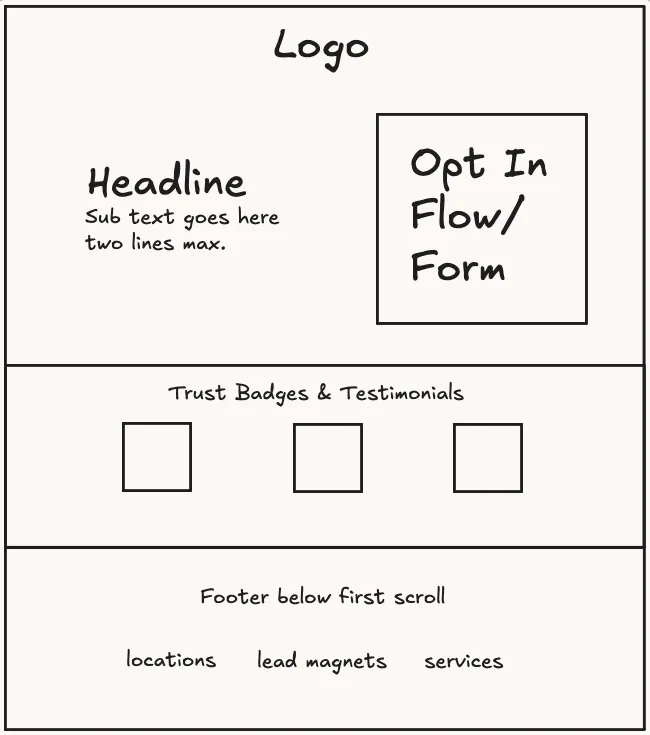
Create a landing page that's the exact layout of what I have above, and the opt-in should be to book a call with me.Follow-up: paste your Cal.com or Calendly booking link, or its inline embed code.
37. Option A (Poppy): one-screen layout fix
In the video: 1:42:04
I want you to move the trust badges in line with the left half of the page where it says, "Book a call, bring the thing you keep putting off." I want you to put it right under those descriptions as a vertical list of those cards. And make sure that it's one page height perfectly, and the user doesn't have to scroll in order to see the full calendar.38. Option B (Claude Code): install the Website Builder plugin
In the video: 1:51:05 (installed by clicking through Customize → Plugins, not typed)
In Claude Code:
/plugin marketplace add cartcodes/claude-website-builder
/plugin install aif-website-builder@ai-foundations
Or, if you downloaded the zip:
Install the website-builder skill from website-builder.zip in my Downloads folder into my Claude skills folder.39. Option B: start the builder
In the video: 1:51:31
/website-builderExample answers from the demo:
A fictional company called Apex Roofing for a demo.Combinations of location plus service for all the options as well.SEO, AEO and GEO (keyword research, page planning, schema, indexing and the speed check) all run inside the /website-builder interview, so there is no separate prompt for them.
40. Option B: generate site images with Poppy
In the video: 2:04:11
Turn the Poppy connector on first.
Use Poppy to generate some images that are high quality and follow the brand styling and add them to the pages respectively.Stage 4: Bring people in
Meta ads
41. Competitor research board
In the video: 2:14:09
Sent with your brand guide, logo files and sales-video transcript attached.
I would like you to create a board called AI Foundations Meta Ads. Add these files to the board for context, and then also do some research on the top 15 competitors that are offering something similar and add their ads to the board as well using Poppy's built-in researcher for meta ads.42. Competitor research (reusable template)
The same prompt as a fill-in-the-blanks template.
Create a Poppy board called "[Brand] Meta Ads".
Add these files to the board for context: [sales video transcript, brand guide, logo files, offer page].
Then use Poppy's built-in Meta ads researcher to find the top 15 competitors selling something similar to [my offer, in one line] to [who it's for].
Add their ads to the board. Prioritise ads that have been running the longest, because those are the ones making money.
When you're done, tell me which layouts and angles show up most, what each one does to get the click, and which ones nobody in this niche is using yet.
43. Create the static ads (reusable template)
In the video: 2:16:10 (shown already sent)
Using the competitor ads on the "[Brand] Meta Ads" board, create our static ads in Poppy with GPT Image.
Follow our brand guide and use the logo on the board.
Borrow the layouts and angles that work in the competitor ads, but don't copy their designs or their wording.

Our offer: [product] for [price]. [What they get, in one or two lines]. [Guarantee, if any]. [One piece of real proof, e.g. a customer quote].
Use the other Poppy board ([name]) to learn about me and the offer. Keep in mind the ads are for [brand] more broadly, and they may also reach [partner]'s customers, because we share one audience pool.

Create [7] ad formats. For each one give me:
- the image at 1080x1350 (4:5 feed), plus a 1080x1920 version for Stories and Reels;
- a headline of 6 words or fewer;
- 2 to 4 lines of primary text: hook, story, lesson, call to action;
- which audience it's for: [hot / former customers / free signups / cold].

Rules: use only facts from the board. Don't invent results or numbers. No hype words, no emojis, no em dashes. Keep the text on the image to the headline, large enough to read on a phone.
44. Fix an ad creative
In the video: 2:17:48
Make the tabs look more convincing. Right now they just look like a blob of random stuff, but it would be good if they showed things like actual spreadsheets that really looked like a spreadsheet. Maybe a Google search page. Make them kind of look like Mac OS windows. And then make our thing that they're going to have a Claude logo and kind of look like the open Claude screen. I have an image in one of our social media posts of an open Claude screen, so that should work fine. Also, make sure that the logo is pixel perfect on that one, because right now the logo looks kind of bad.45. Poppy copilot: ad performance check
In the video: 2:29:00
Typed in the Poppy Meta Ads copilot.
Tell me how our ads are going right now.46. Poppy copilot: draft a cold campaign
In the video: 2:29:25
I want you to create a new cold ad campaign using the best possible audience. Could you draft up a cold campaign using some of the same strategies that we've already used, but make it better for cold audiences and target it towards one of our lead magnets?47. Poppy copilot: creatives and registration conversion
In the video: 2:30:32
Two messages. For the second, copy your lead-magnet page as markdown and paste its URL.
Let's use ad one. I want you to craft up a few different creatives for ad one. And instead of the button saying Download, I want it to take them to the sign-up page, and I want our conversion event to be a sign-up or a registration on that actual page.This is our page that they get access to after registration.
[paste the page copied as markdown]
This is the URL of that page to send people to.
[paste URL]
Conversion event should be a registration on our website. Ad budget at $20 per day to start.48. Poppy copilot: put the variants on the board
In the video: 2:31:52
Go ahead and create these creative variants on the board so that I can see what they're going to look like. Make sure you use our accurate logo, if you do use our logo. And aim for an ad in the spirit of what has worked for us in the past.49. Claude + Poppy: resize the cold ads for every placement
In the video: 2:32:42
Typed in Claude.
Check out the ad creatives for the new cold ad campaign that we're getting ready to run for the AI OS campaign for that free resource. And I want you to create multiple versions of that ad that will fit all the screen sizes properly and that will fit within the bleed lines of a typical post on something like Reels or something like an Instagram post. I want these to be pixel perfect, highly accurate logo, standout ads.50. Claude + Poppy: tidy the board
In the video: 2:33:44
Clean up the AI Foundations meta ads board. It's a little bit messy now that I've dropped those in.51. Claude + Poppy: launch the cold campaign
In the video: 2:34:15
Draft a cold campaign with all of the proper excluded audiences, but also the 1% lookalike to drive people to this resource, this lead magnet. And I want to make the conversion event a registration on the AI Foundations website. Go ahead and launch this ad with a $20 per day budget and have multiple creatives within that ad set.Email (Resend)
52. Email sequence interview (standalone prompt)
Paste it along with EMAIL-SUBJECT-LINES.md as context.
You are an email copywriter. Interview me briefly, then write my full email sequence. Use the attached EMAIL-SUBJECT-LINES.md as your guide for subject lines, first lines, story types and structure.

## How to run the interview

- Ask **one question at a time** and wait for my answer.
- Keep it to the 8 questions below. Only ask a follow-up if something essential is missing, and never more than 2 follow-ups in total.
- **Skip any question already answered** by files I've attached (an about file, voice file, website, past emails or testimonials). Tell me which ones you skipped.
- Short answers are fine. Rough notes are fine. Don't make me rewrite anything.
- Never invent stories, numbers, customers or quotes. If something is missing, leave a clear [placeholder] in the email.

## Before question 1

Say: "Before we start, attach or paste anything you already have: your website, an about or voice file, past emails or posts, testimonials. I'll skip any questions they answer." Then begin.

## The 8 questions

1. **Your offer.** What do you sell, what does it cost, who is it for, and what's the link?
2. **The freebie.** What did people sign up for (your lead magnet), what quick win does it give them, and what's the link?
3. **Your reader.** Who signs up? What's their biggest problem, what have they already tried that didn't work, and what's their main reason for not buying?
4. **Your story.** Where were you before, what changed, and what's the result now? One real number if you have it.
5. **A second story.** Tell me one of these: a mistake you made, a failure that turned into a win, or a common piece of advice in your field you disagree with.
6. **Proof.** Share 1 to 3 customer results: name (or first name), where they started, what changed, any number or quote. Say "none yet" if you don't have any.
7. **Your writing style.** Paste 2 or 3 things you've written that sound like you (emails, posts, messages). Then tell me: words or phrases you never use, how you sign off, and casual or professional.
8. **The setup.** Is this a **welcome sequence** (for new signups) or a **launch** (selling something with a deadline)? If it's a launch: the dates, the deadline, and any discount or bonus. Also: the sender name and your email tool.

## Then write the sequence

**Welcome sequence: 5 emails over 10 days**

| Email | Day | Job | Story type to use |
|---|---|---|---|
| 1 | 0 | Deliver the freebie and give one quick win | none, or a 2-line origin |
| 2 | 2 | Build rapport with your story | Origin or turning point (question 4) |
| 3 | 4 | Teach something useful, no pitch | Mistake or contrarian (question 5) |
| 4 | 7 | Proof | Customer story or before and after (question 6) |
| 5 | 10 | The offer | Future pacing |

**Launch: 10 emails over about 2 weeks**

- Warm-up (4 emails, the week before): the problem and your story, a teaching email, proof, then "doors open on [date]".
- Cart open (3 emails): it's open, a customer story, answers to objections (question 3).
- Close (3 emails, the last 24 to 36 hours): 24 hours left, the morning of the last day, final hours.
- Add a line in every sales email letting people opt out of the launch emails without unsubscribing.

## Rules for every email

- Structure: **hook, story, lesson, call to action.** Shorter reminder emails in a launch can skip the story.
- Give each email: send day, **2 subject line options** for A/B testing, the first line (preview text), the body, and one call to action with its link.
- Subject lines: 2 to 6 words, plain, sounds like a person. Use the patterns in EMAIL-SUBJECT-LINES.md.
- First line: continues the subject line, never repeats it, 40 to 90 characters.
- Body: 150 to 300 words, short paragraphs, one story and one lesson per email.
- Voice: match the writing samples from question 7. Use their words, sentence length and sign-off. Never use the words they said they avoid.
- Only one call to action per email.
- True stories only. Use [placeholder] for anything missing.

## When you're done

Show all the emails in order. Then list every [placeholder] I need to fill in, and ask: "Want me to change the tone, length or any email?"
Don't have EMAIL-SUBJECT-LINES.md yet? Here it is. Copy it into a file named EMAIL-SUBJECT-LINES.md and attach it with the prompt above.
# Email subject lines and first lines: templates

A context file for writing marketing emails for any business: welcome sequences, newsletters and launches.
Every email follows **hook, story, lesson, call to action**. The hook is the subject line plus the first line (the preview text).

Fill in the [brackets] with the business's own details. Keep the result short and plain.

## Rules that hold up in published data and tests

1. **Short and plain beats clever.** In Belkins' 2025 study, subject lines of 2 to 4 words got the highest opens (about 46%), falling to about 34% at 10 or more words. Yesmail's study of 7 billion emails also found shorter subject lines drove more opens and clicks.
2. **Sound like a person, not a brand.** The Obama 2012 campaign tested up to 18 subject lines per email. Its best performer of hundreds was simply "Hey", and it raised millions. The plain "I will be outspent" was another top performer. The same message with a weaker subject line raised about half as much.
3. **A specific question works.** In the Belkins study, questions were the top format (about 46% opens). The question has to be specific enough to feel relevant and open enough that you have to read the email to get the answer.
4. **Numbers help.** Belkins measured numbers at about 44% opens, close behind questions.
5. **Personalisation lifts opens when it's real.** Belkins: about 46% opens with personalisation vs 35% without. A first name helps sometimes. Their situation (what they downloaded, what they're stuck on) helps more.
6. **The preview text continues the subject line; it doesn't repeat it.** Put the most important words first and keep it to roughly 40 to 90 characters. Never waste it on "View this email in your browser".
7. **Test.** Every source above says your list beats any benchmark. Send two subject lines to a small slice first, then send the winner to everyone (the Obama method).

Caveats: Belkins is cold B2B email, and most of these numbers are correlations, not controlled tests. Use them as defaults to test, not laws.

---

## 50 subject line templates

### Plain delivery (welcome email 1)
1. Your [lead magnet] is ready
2. Here's your [checklist / guide / template]
3. [First name], your download
4. As promised
5. Before you open [lead magnet]

### Short and personal (the "Hey" pattern)
6. hey
7. quick question
8. can I be honest?
9. a note from [your first name]
10. did you see this?
11. one more thing
12. sorry, wrong link

(Only use #12 when you genuinely sent a wrong link. It gets opened because it's true.)

### Specific questions
13. Did you finish step 1?
14. What did you try first?
15. Still [doing the painful thing manually]?
16. Is your [thing] still [common problem]?
17. How many [time-wasters] do you have right now?
18. What would you do with [time or money saved]?
19. Which one are you?

### Story openers (welcome email 2, rapport)
20. The [thing] that changed my [result]
21. I almost quit [activity] in [year]
22. The mistake I made with [topic]
23. What I changed this week
24. How a [small input] turned into [big result]
25. I was wrong about [topic]
26. The day [milestone happened]

### Teaching and how-to (welcome email 3)
27. How to [get desired result] without [pain]
28. The [number] levels of [skill]
29. Steal my [template / script / checklist] for [task]
30. The [time]-minute [setup / fix / routine]
31. One [habit / tool / tweak] that replaced [old way]
32. Why your [thing] isn't working
33. Do this before your next [task]

### Numbers and lists
34. [Number] [things] I use every day
35. [Number] [tips / tools / templates] for [audience]
36. [Result] from [small number of actions]
37. [$ amount] from one [campaign / email / post]
38. [Number] days, [number] steps, 1 [result]

### Proof and testimonials (welcome email 4)
39. How [customer] got [result] in [time]
40. "[short real quote from a customer]"
41. What [number] [customers / members] [achieved] this [week / month]

### Offer emails (welcome email 5, launch open)
42. Doors are open
43. [Offer name] is open (until [day])
44. You're invited
45. Is this for you?

### Launch deadline (the last 24 to 36 hours)
46. 24 hours left
47. Closes tonight
48. Last call
49. Final hours: [offer name]
50. Last email about this

---

## 50 first line (preview text) templates

The first line shows as the preview next to the subject line, so it's the second half of the hook. Each template continues the subject line, leads with the important words, and stays short.

### Deliver the value immediately
1. Here's the link: [link]. It takes [time].
2. Your [lead magnet] is below. Start with step 1.
3. As promised, here it is. Plus one tip most people miss.
4. Quick warning: most people download this and never open it.
5. Before you open it, do one thing first.

### Open a loop (curiosity that the email closes)
6. Number [X] changed how I [do the thing].
7. I wasn't going to share this.
8. This one surprised me.
9. It's not what you think.
10. There's a catch, and it's a good one.

### Start the story mid-scene
11. In [month], I was [stuck in a specific, relatable situation].
12. Last [day], a [customer / reader] sent me this.
13. [Time] ago I almost [quit / gave up on] [thing].
14. My first [attempt] got [result]. My second got [worse result].
15. I'll never forget the first time [moment].
16. For months, my [thing] [had a specific problem].

### Call out the reader's problem
17. If you're still [painful habit], read this.
18. You don't have a [surface problem]. You have a [real problem].
19. Most people use [tool / method] like [wrong way].
20. If your [effort] gets [vanity result] but no [real result], this is why.
21. You've probably tried [common fix]. Here's why it didn't stick.

### Ask a question
22. Quick question: [specific question about their situation]?
23. Can I ask you something?
24. Be honest: how often do you [do the thing]?
25. What would you [build / do] if you had [resource]?
26. Did you get stuck on step [X]? Most people do.

### Contrarian or honest
27. Unpopular opinion: you don't need more [tools / tactics].
28. I was wrong about [topic].
29. Most [topic] advice is backwards.
30. Here's what nobody tells you about [topic].
31. I'll keep this one short.

### Proof first
32. [Result], [number] [actions]. Here's exactly how.
33. [Customer] went from [before] to [after] in [time].
34. This [email / post / offer] beat my last [number] [ads / launches].
35. Here's the exact [template / script]. Copy it.
36. Screenshot below. No edits.

### Teach in one line
37. The fix takes [time]: [one-line fix].
38. One [thing] changes everything: [thing].
39. [Step 1], [step 2], [step 3]. That's the whole method.
40. Do [step people skip] first. Then [the step they start with].
41. Here's the [number]-step version.

### Personal and plain
42. Hey [first name], [your first name] here.
43. Short one today.
44. I've been meaning to send you this.
45. Writing this from [place / situation].

### Offer and urgency (launch emails)
46. Doors are open, and here's who it's for.
47. The price goes up at [time]. Here's what you get.
48. [Time] left. If you're on the fence, read this.
49. This is the last email about [offer name].
50. If it's not for you, no problem. Here's what's inside anyway.

---

## Pairing examples (subject line + first line)

| Subject line | First line |
|---|---|
| Your [lead magnet] is ready | Quick warning: most people download this and never open it. |
| The mistake I made with [topic] | For months, my [thing] [had a specific problem]. |
| hey | Quick question: [specific question about their situation]? |
| [$ amount] from one [campaign] | [Result], [number] [actions]. Here's exactly how. |
| 24 hours left | If you're on the fence, read this. |

---

## Storytelling in emails

### What the research says

1. **A story makes the same thing worth more.** In the Significant Objects project (2009), Rob Walker and Joshua Glenn bought 100 thrift-store items for $128.74 in total. Writers made up a short story for each one, and the items were listed on eBay with the story as the description. All 100 sold, for $3,612.51 in total, an increase of about 2,700%. Every single item sold for more than it cost. It was a self-run experiment, not peer-reviewed, but the takeaway is clear: the story, not the object, created the value.
2. **Absorbed readers change their minds.** Melanie Green and Timothy Brock's research on *narrative transportation* found that when people get absorbed in a story, their beliefs shift towards the story's point of view. The effect was about the same whether the story was labelled fact or fiction. Absorption is the goal: specific details, a real person and something at stake.
3. **Emotional stories move people to act.** Paul Zak's lab showed people a short story about a father and his son with cancer. Viewers who stayed engaged with the story released more oxytocin and gave more of their study earnings to charity. The details of the study are reported inconsistently in popular write-ups, so use it as directional, not exact.

What this means for an email: one real person, one specific moment, something at stake, and one lesson the reader can use. Facts persuade less on their own than the same facts inside a story.

### Rules for story emails

1. **Start mid-scene.** Skip the setup. Open with the moment: "In [month], I was [specific situation]."
2. **Use concrete details.** A time, a place, a number, an exact quote. Details are what make readers absorbed.
3. **Show the problem before the fix.** Without struggle, there's no story. The reader should recognise their own problem in it.
4. **One story, one lesson.** Don't stack three stories. Say the lesson in one sentence.
5. **Connect the lesson to the call to action.** The story earns the click. The call to action should feel like the obvious next step.
6. **Keep it short.** Most story emails work at 150 to 300 words. Cut anything that doesn't move the story forward.
7. **Only tell true stories.** Readers trust you because the story is real. Never invent customers, numbers or quotes.

### 10 story types that work in emails

1. **Origin:** "[Time] ago, I was [where the reader is now]."
   Best for: welcome email 2, building rapport.
2. **Mistake:** "The worst [decision] I made with [topic] was [mistake]."
   Best for: building trust, teaching.
3. **Turning point:** "Everything changed when I [discovery]."
   Best for: introducing your method.
4. **Before and after:** "Before: [painful situation]. After: [result]. Here's what changed."
   Best for: proof emails.
5. **Customer story:** "[Customer] came to us [stuck on problem]."
   Best for: testimonial email, launches.
6. **Behind the scenes:** "Here's what actually happened when we [launched / built / tried] [thing]."
   Best for: newsletters, launches.
7. **Contrarian:** "Everyone told me to [common advice]. I did the opposite."
   Best for: standing out, teaching.
8. **Small moment:** "Yesterday, [small everyday moment] reminded me of [lesson]."
   Best for: weekly newsletters.
9. **Failure then win:** "My first [attempt] got [bad result]. Here's what I did differently."
   Best for: proof and teaching.
10. **Future pacing:** "Imagine it's [time] from now and [desired result]."
   Best for: offer emails.

### Story email template (hook, story, lesson, call to action)

```
Subject: [short, plain subject line from the list above]
First line: [start mid-scene, with one concrete detail]

Story (3 to 6 short paragraphs):
- The moment: where you or the customer were, and what was at stake.
- The struggle: what didn't work, in specific terms.
- The turn: the one thing that changed.
- The result: what happened next, with a real number if you have one.

Lesson (1 to 2 sentences):
"[The one thing the reader should take away.]"

Call to action (1 line):
"[One clear next step that follows from the lesson]: [link]"
```

---

## Campaigns that worked (documented results)

Companies rarely publish full email results, so these three are the best-documented examples. Each one shows a principle from this file.

### 1. Obama 2012: plain subject lines and constant testing
- **Result:** most of the roughly $690 million the campaign raised online came from email appeals.
- **What they did:** every email was tested with up to 18 subject line versions on small groups first, then the winner was sent to everyone.
- **What won:** the plainest, most personal lines. "Hey" was the biggest earner. "I will be outspent" raised about $2.5 million in a single send. A weaker subject line on the same message raised about half as much.
- **Lesson:** sound like a person, and test subject lines instead of guessing.

### 2. Harry's prelaunch: 100,000 emails in one week
- **Result:** about 100,000 email signups in one week before the razor brand launched, according to co-founder Jeff Raider's write-up on Tim Ferriss's blog.
- **What they did:** a simple two-page site. Sign up, then get a personal referral link. The more friends who signed up through your link, the bigger the free product you earned. The emails were short, plain and built around sharing.
- **Lesson:** give people a reason to share, and keep the ask to one simple action.

### 3. Morning Brew: a newsletter grown by its readers
- **Result:** grew to millions of subscribers. Referrals drove about 80% of growth before paid ads, and about 30% of new subscribers each month later on (as reported by its growth team; the numbers vary by source and date).
- **What they did:** a referral link at the bottom of every issue, with rewards at set milestones (stickers, then merchandise). One merchandise referral campaign alone brought in more than 75,000 new subscribers.
- **Lesson:** a newsletter people enjoy is the growth engine. Give readers a reason to forward it.

## Sources

- [Belkins: B2B cold email subject line statistics (2025)](https://belkins.io/blog/b2b-cold-email-subject-line-statistics)
- [Fulcrum: personalised subject lines and open rates](https://fulcrumtech.net/resources/personalize-email-subject-line-more-opens-clicks/)
- [Dialog Insight: what affects open rate](https://www.dialoginsight.com/en/?p=1606)
- [Bloomberg Businessweek: the science behind the Obama campaign emails (archived)](https://webarchive.library.unt.edu/web/20130118230059/http://www.businessweek.com/articles/2012-11-29/the-science-behind-those-obama-campaign-e-mails)
- [The Week: why the Obama campaign emails worked](https://theweek.com/articles/469961/why-president-obamas-annoying-campaign-emails-worked)
- [MediaPost: Obama campaign email testing](https://www.mediapost.com/publications/article/189066/)
- [beehiiv: email preview text examples](https://www.beehiiv.com/blog/email-preview-text-examples)
- [Loops: preview text](https://loops.so/glossary/preview-text-or-pre-header-text)
- [Email on Acid: preheader text guide](https://emailonacid.com/papers/email-preheader-text-guide)
- [Significant Objects: project results](https://significantobjects.com/?p=2597)
- [NPR: Significant Objects](https://www.npr.org/transcripts/121690381)
- [Green and Brock: narrative transportation (paper PDF)](https://gwern.net/docs/www/pdfs.semanticscholar.org/39691cee32e52fbfc33f1a0316aa0d008cb699a4.pdf)
- [Transportation theory (overview)](https://wikipedia.com/wiki/Transportation_theory_(psychology))
- [Paul Zak: how stories change the brain](https://www.dailygood.org/story/659/how-stories-change-the-brain-paul-j-zak/?lang=sv)
- [MediaPost: most of $690 million raised online came from email](https://www.mediapost.com/publications/article/188274/most-of-690-million-raised-online-by-obama-campai.html)
- [ABC News: odd Obama email subject lines drew huge cash](https://abcnews.go.com/blogs/politics/2012/11/odd-obama-email-subject-lines-drew-huge-cash)
- [Tim Ferriss: how to gather 100,000 emails in one week (Harry's)](https://tim.blog/2014/07/21/harrys-prelaunchr-email/)
- [Prelaunchr: Harry's open-source referral app](https://github.com/fishbein/prelaunchr)
- [SparkLoop: the secrets behind Morning Brew's growth](https://sparkloop.app/blog/the-secrets-behind-morning-brews-growth-to-2-million-newsletter-subscribers-6)
- [Referral Rock: Morning Brew referral program](https://referralrock.com/blog/morning-brew-referral-program/)
- [Digiday: newsletter referral programs](https://digiday.com/media/its-an-undervalued-growth-channel-publishers-eager-for-subs-increasingly-see-high-value-in-newsletter-referral-programs/)
- [Stitchi: Morning Brew referral swag case study](https://www.stitchi.com/case-studies/morning-brew-newsletter-referral-swag)
53. Run the Poppy email template interview in Claude
In the video: 2:41:35
Paste the interview from the Poppy email marketing template underneath, with the Poppy connector on.
Get the HSLC Email Marketing Template in Poppy
Open the board, copy its interview, and paste it under the prompt below.
I want this interview to be filled out in this exact format, and I want you to walk me through this interview. I'm going to enable voice mode. And I want you to talk me through this and get all of the questions answered. And then once it's ready, I want you to deliver the final packaged prompt.
[paste the interview from the Poppy template]
Prefer typing? Swap "I'm going to enable voice mode" for Use the user question and answer flow.
54. Write the welcome sequence (Poppy chat)
In the video: 2:43:31
Typed in a Poppy chat with the completed template connected.
Write the welcome sequence for our emails.55. Claude Code: add Resend to the website
In the video: 2:44:28
I would like you to help me integrate Resend into the website for sending a welcome sequence for our lead magnets. Here's the email sequence that I want you to use for the lead magnet:
[paste the welcome sequence]
56. Claude Code: build and deploy the sequence
In the video: 2:46:27
First set a Claude Code environment variable RESEND_API_KEY=<your key> (New Environment → Environment Variables).
I would like you to use the environment variable for Resend to create the sequence for [your sending domain]. Set it up with Cloudflare for when someone applies for a lead magnet. Deploy using this secret on Cloudflare and set up the full broadcast.Affiliate page
57. Claude Code: affiliate links archive
In the video: 2:51:54
Create an archive of all of our affiliate links as a canonical page that links to them individually in the footer and a full archive page with all of them linked as well.

Here are the first affiliate links to use:
Skool: [your Skool affiliate link]
Poppy: [your Poppy Refer and Earn link]
[any other affiliate links]
If Claude does not offer to publish, tell it to publish the changes to the live site.
Scaling
No new prompts here. Scaling reuses the moves from earlier in the course:
• Every repeat becomes a skill: do the task once in a chat, then ask Claude to turn that conversation into a skill (see prompt 12).
• Put it on a schedule: see prompts 13 and 27.
• Feed the loop: the Memory Loop, prompts 25 and 27.